
Before You Add Funds
Before adding funds, check these points to avoid failed payments, delayed balance updates, or bonus confusion.
- You are logged in to your verified Raja Game account on the official platform
- You have confirmed the platform URL begins with HTTPS
- You understand and accept the welcome bonus wagering requirements before depositing
- You have a payment method ready — UPI app, bank details, or crypto wallet
- You have set a personal deposit limit for this session
- You are not depositing money you cannot afford to lose
Can You Deposit Without Login?
No. Deposits must be made from your logged-in account using the wallet section. Never send funds to personal accounts, chat contacts, or third-party links.
How to Add Funds to Your Account
Step 1: Log In to Your Raja Game Account
Use your registered mobile number and password to login to Raja Game platform . Deposits should only be made from your verified account on the official platform.
Step 2: Access the Deposit Section
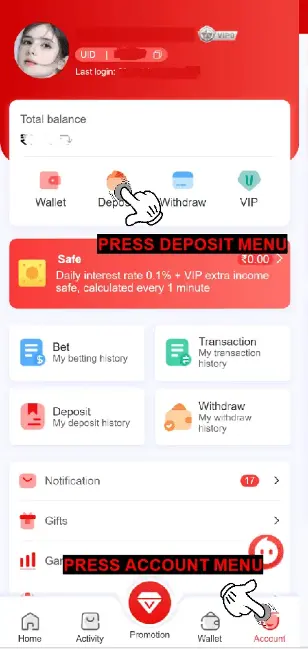
Once logged in, navigate to the Deposit option within your account dashboard. This is located in the main menu or under the wallet or account section. Select Deposit to access the list of available payment methods.
Step 3: Select Your Preferred Deposit Method
Raja Game website supports multiple deposit methods, but not all payment channels behave the same. Choosing the right method first helps avoid failed transactions and balance delays.
Supported Payment Options
Raja Game supports deposits through UPI apps such as Paytm, PhonePe, and GPay, along with cryptocurrency (USDT) options depending on availability inside the wallet.
How to Deposit via UPI on Raja Game
UPI is the most commonly used deposit method on Raja Game because it is fast and familiar for most Indian users. If a UPI transaction fails, switching channels is usually better than retrying the same method repeatedly.
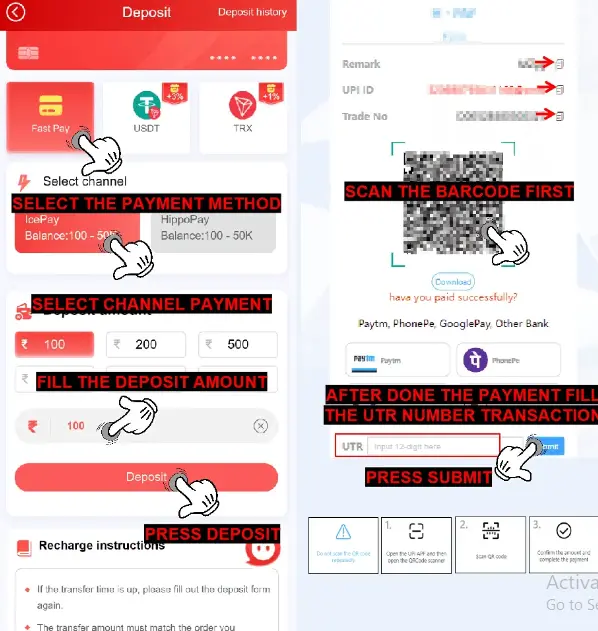
- Select Recharge: After choosing “Deposit,” click on the “Recharge” option.
- Choose UPI as Your Payment Method: Under the recharge options, select “UPI APP.”
- Select a Payment Channel: Depending on availability, you can select Paytm, PhonePe, or GPay.
- Enter Payment Details: You’ll be directed to the payment page, where you should select your UPI account and authorize the payment.
Important: If a UPI payment fails, switch to another available UPI channel before retrying. Repeated rapid attempts can trigger temporary restrictions.
How to Deposit via Cryptocurrency (USDT) on Raja Game
USDT is available for users who prefer crypto deposits. Because wallet addresses are generated per transaction, accuracy matters more than speed when using this method. Raja Game supports USDT (TRC 20) for users who prefer cryptocurrency deposits.
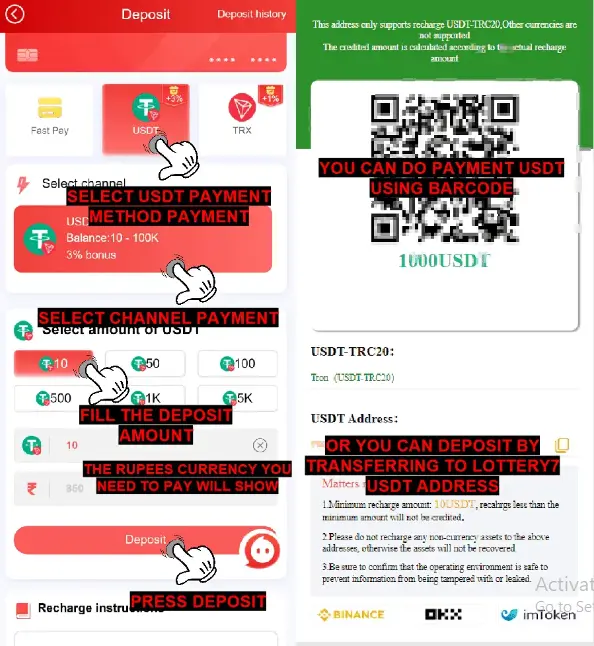
- Select Recharge: Access the deposit options and click on “Recharge.”
- Choose Cryptocurrency (USDT): Select either USDT from the available options.
- Enter Amount: Specify the amount you’d like to deposit.
- Copy Wallet Address: A unique wallet address will be displayed. Copy this address and complete the transfer using your crypto wallet.
- Complete Transfer: Complete the transfer from your crypto wallet to the displayed address
Important: The minimum deposit in USDT is 10 USDT. Deposits below this amount will not be accepted. The deposit amount is converted at the daily exchange rate at the time of transaction. Send the exact amount shown — do not adjust the amount after the address is generated.
Minimum Deposit and Limits
Raja Games maintains minimum and maximum deposit amounts for each method to ensure transaction consistency and security.
- Minimum Deposit: ₹100
- Maximum Deposit: ₹50,000* (single transaction)
- Minimum deposit (USDT): 10 USDT
*Maximum deposit limits are set by the platform and may vary. Verify current limits in your account dashboard after login before making large deposits.
How Long Deposits Take
After completing your deposit, the funds should appear in your account balance within a few minutes for UPI and immediately after blockchain confirmation for cryptocurrency. If there is any delay, refer to the troubleshooting section below before contacting support. After placing bets and generating winnings, users can proceed to request a withdrawal on Raja Games directly through the wallet section once eligibility conditions are met.
Users also must respect the fair play compliance rules when using bonuses after depositing on Raja Game.
Most UPI payments appear within a few minutes. USDT deposits are credited after blockchain confirmation. If the balance does not update within the expected time, check the troubleshooting section before contacting support.
Common Deposit Issues and Fixes
Most deposit issues are caused by incomplete payment authorization, UPI limits, or using the wrong payment channel. The fixes below cover the most common scenarios.
While deposits are typically seamless, you may occasionally encounter issues. Here’s a guide to resolving common problems:
Deposit Not Reflecting Immediately
If your deposit does not appear in your account within the expected timeframe:
- For UPI or bank deposits: Check that the transaction was fully authorised inside your payment app. If the payment app shows the transaction as complete but the balance has not updated in Raja Game, wait 10 to 15 minutes before contacting support.
- For crypto deposits: Wait for blockchain confirmation. USDT on TRC-20 typically confirms quickly but may take longer during high network activity.
- If the issue persists after 30 minutes, contact official Raja Game support through in-app live chat. Have your transaction ID or UTR number ready.
Deposit Declined or Failed
If your deposit fails:
- Incorrect UPI details: Verify your UPI ID is entered correctly
- Insufficient funds: Ensure your bank or UPI account has adequate balance
- UPI transfer limits: Some UPI apps apply daily limits. Check your app settings if you are making a larger deposit
- Repeated failures: If multiple UPI attempts have failed, try a different payment method such as bank transfer.
How to Find Your UTR Number
The UTR (Unique Transaction Reference) number is generated by your bank or UPI app when a transaction is processed. Find it in your payment app’s transaction history. You will need this number if you contact support about a missing deposit.
Tips for Safe Deposits
- All deposits must be made through the official platform wallet after login — never through a Telegram channel, WhatsApp, or external agent
- Verify the platform URL begins with HTTPS before entering payment details
- Keep personal records of all transactions including amounts and dates
- Never share payment screenshots publicly
- The platform will never ask you to transfer funds to a personal account.
Before depositing, check the safe access protocol guidelines for full account security.