
Before You Withdraw:
Check these requirements before submitting a withdrawal request. Most failed withdrawals are caused by one of the points below.
- You are withdrawing to your own registered bank account — not to another person’s account
- Your bank account or USDT wallet is already linked to your Raja Game account
- You have met the effective bet requirement for your most recent deposit (see section below)
- Your account identity verification is complete if the platform has requested it
If you have not linked a bank account or USDT wallet yet, follow the setup instructions in the relevant section below before proceeding.
Effective Bet Requirement Explained
Before a withdrawal can be processed, your total wagering must match at least the value of your most recent Raja Games deposit. If this requirement is not met, the withdrawal request will not go through.
Example: if your latest deposit was ₹1,000, you must place at least ₹1,000 in qualifying bets before those funds become withdrawable.
Important note: Progress toward this requirement is visible on the withdrawal page inside your account after login. If you are unsure whether the requirement has been met, check this page before submitting the request. Do not place rushed bets just to force eligibility.
How to Withdraw from Raja Game
Raja Game supports bank account and USDT withdrawals. In both cases, payout details must be linked before the first withdrawal request can be submitted.
Method A: Bank Card Withdrawal
To withdraw to your bank account, first link your bank details:
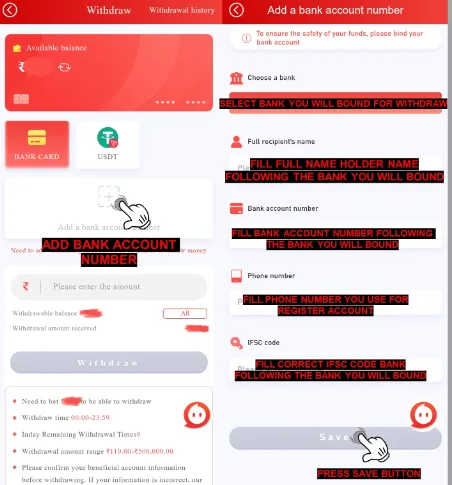
- Add Bank Account: Begin by selecting “Add Bank Account” in the withdrawal menu.
- Select Your Bank: Choose the bank you want to link to your account.
- Enter Required Information: Provide the following details:
- Your full name (as registered with your bank)
- Bank account number
- Active phone number and email address
- IFSC code (the unique identifier for your bank branch)
- Save and Verify: Click “Save” to proceed to SMS Verification.
- Request OTP: Click “Send” to receive a One-Time Password (OTP) on your registered phone number.
- Enter OTP: Input the OTP received, and click “Add Confirm” to finalize your account setup.
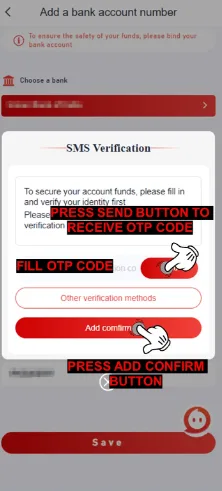
Note:Double-check the IFSC code before saving. An incorrect IFSC code is one of the most common causes of withdrawal rejection. If your withdrawal is rejected with the remark “IFSC Code Incorrect,” see the fix section below.
Once your bank account is linked, submit a withdrawal:
- Open the withdrawal menu
- Select Bank Card
- Enter the amount to withdraw (minimum Rs 110)
- Confirm the request
Method B: USDT Withdrawal (TRC-20)
If you prefer withdrawing via USDT on the TRC-20 network, you’ll need to bind your wallet address:
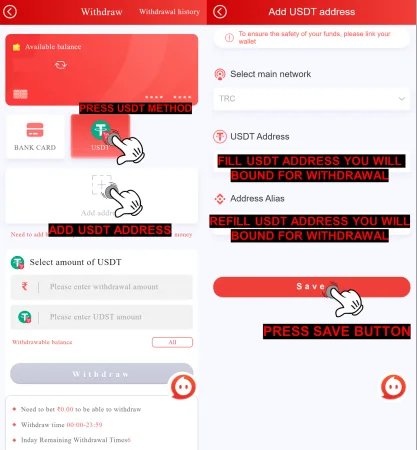
- Select USDT Method: In the withdrawal menu, choose the “USDT” option.
- Enter USDT Address: Click “Address USDT” and input your wallet address. Ensure the main network is set to TRC-20.
- Confirm Address Details: Re-enter the wallet address under “Address Alias” for verification.
- Save and Verify: Click “Save,” and the SMS Verification screen will appear.
- Request OTP: Click “Send” to receive an OTP on your registered phone number.
- Enter OTP: Enter the OTP received, and click “Add Confirm” to complete the process.
Important: Your USDT wallet address must be entered precisely. Errors in the wallet address cannot be corrected after submission and may result in permanent loss of funds. Verify the address character by character before saving.
Withdrawal Processing Time
Most withdrawals are reviewed within a few hours. Bank processing may take longer after the platform marks a request as completed.
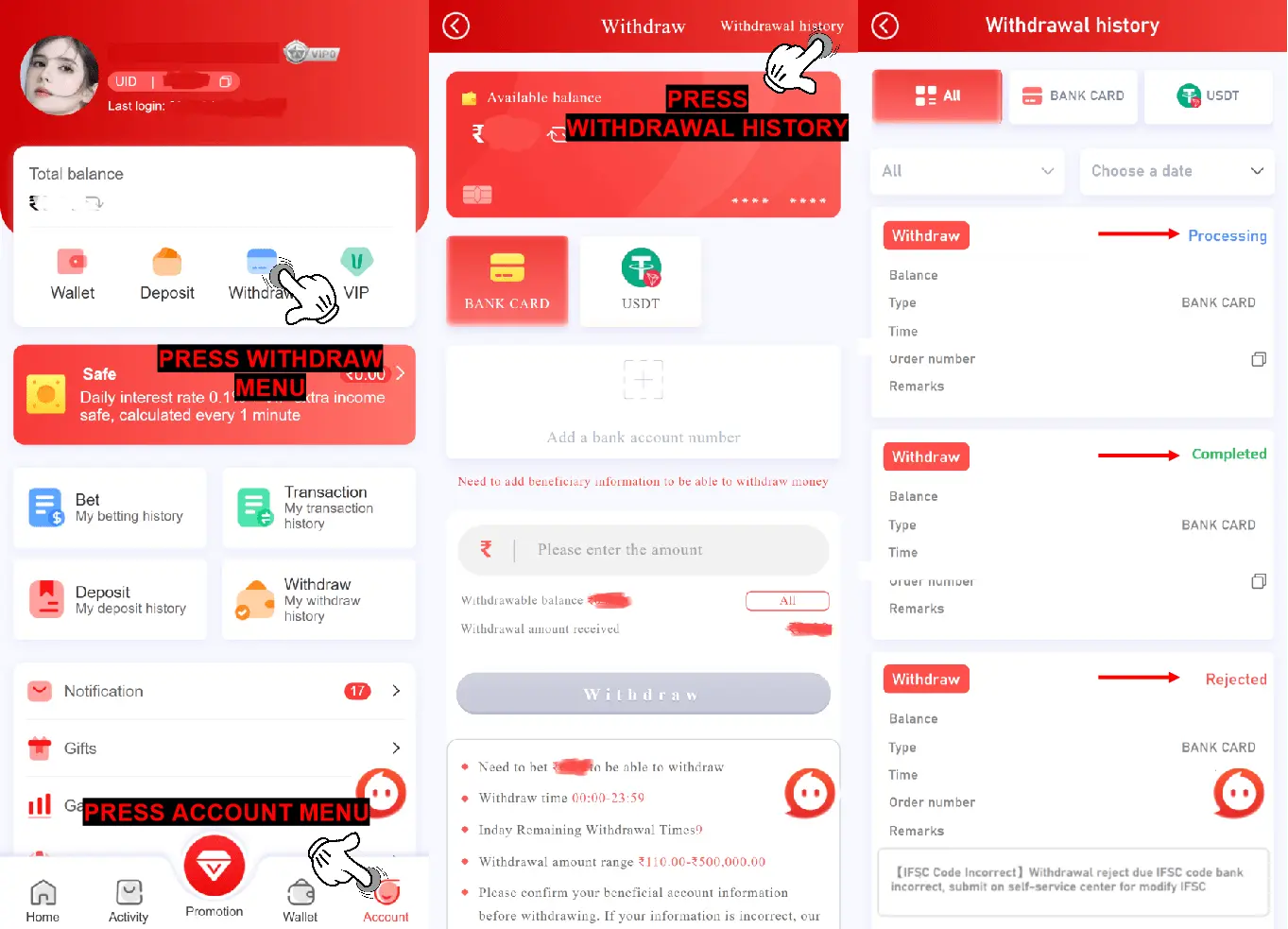
How to Check Withdrawal Status
Check your withdrawal status in the transaction history section of your dashboard before contacting support.
Processing: Your request has been submitted and is under review. Most withdrawals are reviewed within a few hours. If a withdrawal remains in Processing status for more than 3 hours, allow additional time for the bank to complete verification before raising a support query.
Completed: Your funds have been transferred to your linked bank account. Due to inter-bank processing, the amount may take up to 24 hours to reflect in your bank account after the status shows Completed. If funds have not appeared after 72 hours, contact official Raja Game support through in-app live chat with a PDF copy of your bank statement.
Rejected: Your withdrawal could not be completed. The rejection remark in your transaction history explains the reason. Common reasons and fixes are listed in the section below.
Common Withdrawal Problems and Fixes
Rejected withdrawals usually happen because account details, betting eligibility, or payout conditions do not match platform requirements. The most common reasons are listed below.
Bank Data Incorrect Reason: The name, account number, or IFSC code on file does not match your bank’s records. Fix: Delete the linked bank account, re-add it with exactly correct details, and resubmit.
IFSC Code Incorrect Reason: The IFSC code entered does not match the branch linked to your account number. Fix: Find your correct IFSC code on your bank passbook, cheque book, or your bank’s official website. Submit an IFSC modification request through the support section. Once confirmed, resubmit your withdrawal.
Bank Limit Reason: Your bank has imposed a daily or single-transaction receiving limit that the withdrawal amount exceeds. Fix: Contact your bank to confirm receiving limits. Try withdrawing a smaller amount, or wait until the next day if the daily limit has been reached.
Bank Maintenance Reason: Your bank is undergoing scheduled or unscheduled maintenance at the time of processing. Fix: Wait for maintenance to end. Do not attempt to change your bank account details during a bank maintenance period. Resubmit once the maintenance window is confirmed closed.
Illegal Betting Reason: The platform’s risk system has flagged betting activity that violates fair play terms — such as placing opposing bets in the same round, using multiple accounts, or using automation tools. Fix: Review the platform’s fair play terms. If you believe the rejection was applied in error, contact official support through in-app live chat with your Game ID.
Gift Codes Reason: Bonus funds from gift codes are subject to wagering requirements before withdrawal. The requirement has not been met. Fix: Check your current wagering progress on the withdrawal page. Meet the requirement before resubmitting.
Technical Issue Reason: A temporary processing error on the platform’s side. Fix: Wait 24 hours and resubmit. If the issue persists, contact official Raja Game support through in-app live chat.